A quick summary of how I set up this site
Initial setup#
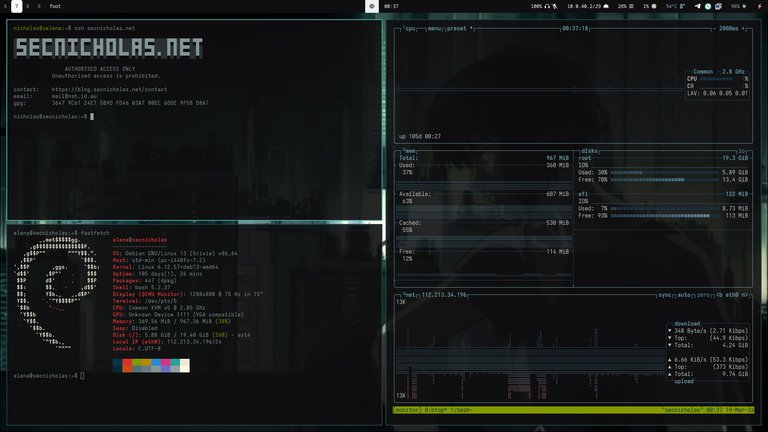
As I’m letting perfectionism and what I’m currently learning and working on deter me from getting more content onto here sooner, I thought I’d post a quick rundown of how I have configured this site just to get something on here and because I’m quite pleased with the end result and figure it may be helpful to anyone who would like to set up something similar.
My initial goal was to keep things as fundamental as possible, I’ve previously set up nginx and Let’s Encrypt and written basic HTML, CSS, JS and PHP, but for the sake of convenience and not wasting too much time centering a div, I decided to look into what options I have available that can generate most of the code and take care of the styling for me.
In my brief research, most of the popular open source options were written in Node.js which I personally try to avoid like the plague. Hugo being written in Go and otherwise keeping things static and simple as well as having theme support made it my first choice and I haven’t looked back since. I pretty quickly found this beautiful theme for it, which fit the image I had in my mind. I’m a little stuck in the past and a sucker for TUI-style anything because of my preference for TUIs in general. There’s no fancy javascript animations or PHP functionality here but it reminds me of websites from my childhood and that makes me happy.
For hosting I looked for a cheap Debian VPS hosted here in Australia and did the following:
- set up SSH keys and tightened SSH access
- made an administrator user with sudo access and a non-administrative blog user
- disabled root user
- installed and configured ufw
- installed and configured fail2ban
- created subdomain blog. and configured DNS entries to point to the vps
- installed and configured nginx and configured blog site (separately from the root domain in case I want to use that later)
- installed certbot and configured nginx https
- ensured site directory permissions are correct
- configured automatic upgrades with unattended-upgrades
- did some minor kernel hardening
I then installed Hugo and the hugo-theme-terminal and configured my blog user to work with it and build the site into the directory nginx is configured to serve. It was pretty obvious git was going to become useful for saving me from manually backing up the site so I then installed that and set up a private repo and an SSH key for pushing/pulling from it which I configured as a read-only deploy key. Finally I wrote a short cron script to check if the repo has changed once an hour, pull the changes if it has and build the site with Hugo.
The minimal static nature of the site reduces the attack surface a lot and I’ve hardened the VPS itself as much as I can. If the VPS does get compromised, I’m not storing anything on here that I’m not already sharing publicly and I can easily revoke the read-only auth key via GitLab from my dev system. Then destroy the VPS, undo any defacement from my local repo on my dev system, set up a new VPS with a new read-only key, pull the repo and be back up.
# Note: One of my new side projects now is to explore better solutions for monitoring the site and being alerted of changes I haven’t made as well as ensuring my process for revoking the key is fast so I can minimize the time it remains defaced in such a situation. I’d also like to soon move from debian to some kind of immutable alternative as I’m starting to become a fan of the immutable desktop OS’s I’m using and I’m eager to try a server version.
Doing it this way lets me make edits to the site locally on my dev system (no need to scp images over to the VPS, I can just copy them into the dir and git push handles that for me), push the changes when I’m ready, and either ssh in and pull the repo if I’m desperate for the change to go live immediately or just leave it from here and wait for the next cron job to do it.
Follow up - 16/03/2026#
Since initially setting this up, I’ve been thinking a lot about my readiness for high traffic situations like virality or a compromise that abuses my network traffic, as well as various methods for securely monitoring the site for defacement and ensuring I have plans in place to recover from it.
-
configured VPS provider’s perimeter firewall with rules mirroring ufw to ensure non-web traffic is still blocked if the ufw process fails or is interfered with
-
ensured VPS provider’s bandwidth and health alerts are enabled for my VPS, particularly to ensure I’m notified well before my network bandwidth hits its monthly limit and begins to overcharge
-
installed vnstat for short-term monitoring. (if I want more granular bandwidth alerting, I could look into using a notifier/mailer with it, so long as the configuration accounts for my billing cycle date instead of the default end of the month)
-
ensured both blog and root domain have rate limiting applied in nginx configs and expanded fail2ban jails to cover nginx, with nginx-limit-req escalating repeated rate limit offenses to nftables bans
-
further tightened CSP headers with my ssl-params nginx snippet to reduce attack surface as much as possible
-
vibecoded Hugo markup render hook render-image.html with Claude and did a bunch of small Hugo tweaks to ensure the images I uploaded were being compressed and the overall site delivery was as optimised as I could get it (like ensuring CSS and JS files were being bundled and not split)
-
vibecoded “svg-viewer.js” to make my homelab diagram a bit more readable with simple JS
- # Note: I’m not a fan of vibecoding most things but I was happy to do it here because simple HTML and JS that control visual elements aren’t really concerns in my security model, especially with the strict CSP hardening I did previously that blocks external and inline script injection and I understand HTML, CSS, and JS well enough to audit the code the LLM produced and ensure it’s not breaking things
- # UPDATE: I reworked this to load the svg inline to improve the rendering quality when zoomed out. Now the homelab page is the one page on my site throwing console errors as the svg contains style info that gets blocked by my CSP. For now I’m just accepting the errors as a compromise, as everything works fine with the browser falling back without these styles. lol “looks fine on my system” please contact me if it doesn’t look right for you
-
subset the Iosevka font I chose to what I’m actually using and managed to bring each variant to ~160KB from ~1-1.5MB
-
scripted a simple site monitor script on my dev machine that runs every 10 minutes via a systemd user service/timer and hashes the site and compares it against hashes I generate with another script I’ve introduced into my posting workflow. If the hash comparison fails, it uses notify-send to give me an on-screen alert warning me the site might be defaced. # For now it just hashes each site page’s HTML content. I’m going to come back to this soon and rewrite it to ensure it does assets as well which should be cheap enough (performance-wise) to do regularly now I’ve reduced the size of them
-
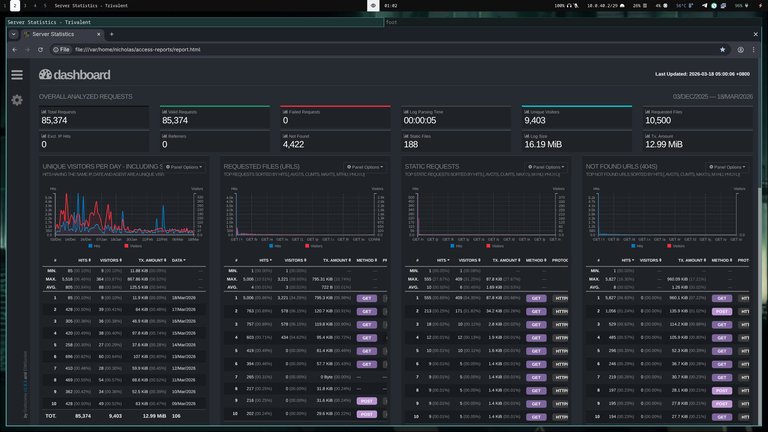
installed goaccess and set up a cron script to generate site metrics on a regular basis (for a second there I was excited to keep it really simple and script something small that gives me more obvious metrics than just reading nginx access logs directly but I’m glad I stopped and thought about that for a while and realized that’s a potential avenue for command injection. Also, goaccess reports are pretty nice and help a lot for determining what’s real traffic and what are just bots/crawlers)
- # Currently, when I want updated goaccess stats I have to manually scp -r the access-reports dir that the cron script on the VPS generates. For now I don’t need anything real-time but I’ll probably come back to this again pretty soon because I know there are better methods that still keep things very simple
- # Currently, when I want updated goaccess stats I have to manually scp -r the access-reports dir that the cron script on the VPS generates. For now I don’t need anything real-time but I’ll probably come back to this again pretty soon because I know there are better methods that still keep things very simple
Penetration test - 17/03/2026#
As a final sanity check I set up a Kali VM on one of my Proxmox hosts (still working on my 9020 SFF vm machine) (figure this will be a good reserve VM if I need a separate host when I pentest my LAN in future too) and did a quick penetration test. I’ve kept the site simple and static enough that there’s unfortunately (in regards to me having fun) not too much that I can test. Despite that, I still managed to acquire some findings, which is a good personal reminder of why pen-testing is so important, and why I should do it routinely.
- manually tried using
sshwithout a keyfile on both my user accounts - used
curl -Iandwhatwebto check header exposure and server info leakage - checked common paths with
curllike /.git/ and /server-status and confirmed they return 404s (not found) - used
gobuster dirwithdirb/common.txtto check for any unexpected exposed paths - used
nmapto do a targeted services scan - checked cipher suites with
nmap --script ssl-enum-ciphers -p 443and security headers with SecurityHeaders - tested rate limiting via an external IP by using Termux on my GrapheneOS phone over mobile data to fire curl requests repeatedly at the site
- temporarily whitelisted my home IP in fail2ban and nginx’s rate limiting and did a full port sweep with
nmapand broader scans withniktoandnuclei
Findings:#
-
Hugo version was leaking via meta generator tag (fixed with disableHugoGeneratorInject = true in Hugo.toml)
-
Debian version was visible in SSH banner (fixed with DebianBanner no in sshd_config)
- # Note: not really critical in my model since most version info can be inferred from just reading this page/viewing the screenshots I neglected to obfuscate
-
fail2ban wasn’t applying bans and this made me realize my configuration was pretty mangled. (I’m thankful I configured diceware passphrases and set sshd to only allow key authentication). Fixed it by redoing my configuration to properly account for my site log paths. I also ensured the nftables firewall backend was configured and correctly adding ban rules
-
Discovered ufw had been left disabled after I was last diagnosing something. (Glad I caught that, and that the VPS provider firewall I recently configured was covering me for situations like this)
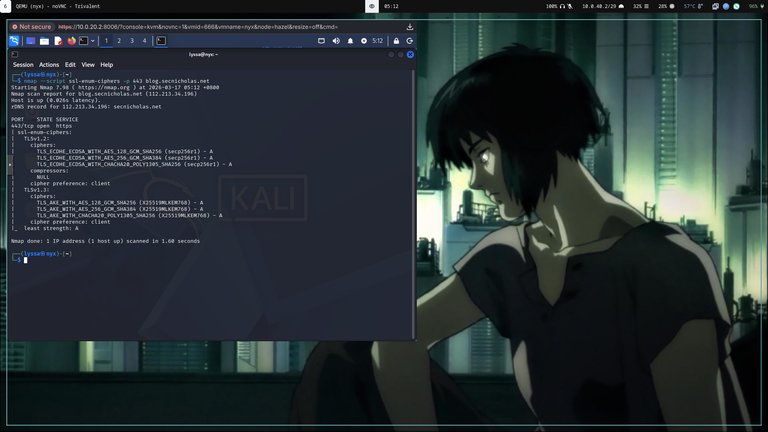
- I opted leave fixing SPICE and this window’s rendering until another day lol
- UPDATE: Turns out all I needed to do was use
remote-viewerinstead.. SPICE was working fine. the .vv just wasn’t playing nice with Remmina
Follow up - TBD#
# Coming soon
Specifications#